05.08.2025 by Viktor Siebert
Successful Repair of an Mitsubishi MDS-C1-CV-185 Power Supply Unit
A customer contacted our team because their CNC machine had completely failed. The power supply seemed dead: no display, no signals, no signs of life. In such cases, fast action is crucial and that’s where our internal procedures come into play.
Our experienced sales team asked targeted questions: What voltages are present? What happens if all connected loads are removed? Were any error messages displayed previously? Based on the answers, it became clear that an internal failure had occurred, the MDS-C1-CV-185 was unresponsive to any external action. Since we are very familiar with this power supply model and have repaired many units of this type, the case was obvious: total failure of the internal voltage supply.
Thanks to our experience with this series, we were able to provide a quick assessment. The customer was advised over the phone to send the power supply via express courier, which he did immediately. Upon arrival, our technician confirmed the issue on our test bench. The internal operating voltages had completely collapsed. Shortly after, the fault was located: aged electrolytic capacitors had caused an internal short circuit, which in turn damaged further components of the power supply.
Our technicians then carried out a comprehensive overhaul. More than 30 components were replaced in total, including all high-voltage capacitors and several power semiconductors. The board was cleaned, all solder joints were reworked, and the unit underwent our full testing cycle.
Just two days after receiving the unit, we were able to send it back fully functional. The customer immediately installed it and restarted the machine. A typical example of how experience and speed can make a difference in the industry.
When the MDS-C1-CV-185 Doesn’t Start: Step-by-Step Diagnostic Guide
1. Safety First
- Disconnect the machine completely from the power supply
- Wait at least 15 minutes to ensure all capacitors are discharged
- Wear appropriate personal protective equipment
2. Check External Power Supply
- Is the main power switch turned on?
- Check all external fuses and circuit breakers
- Measure the input voltage using a multimeter (target value: 3AC 200–230 V)
3. Perform Visual Inspection
- Do you notice a burnt smell?
- Look for discoloration, burn marks, or blackened areas on components
- Are the electrolytic capacitors bulging or leaking?
- Ensure all connectors and cables are securely attached
4. Evaluate Status Indicators and Error Codes
- Are the status LEDs lit? Do any of them blink in a specific pattern?
- Is an error code displayed?
- Refer to the manual for interpretation of LED patterns and error codes
5. Check Internal Fuses
- Locate the fuses on the internal circuit board
- Use a multimeter in continuity mode to check each fuse
- Replace blown fuses only with correctly rated replacements
6. Inspect the Fans
- Do the fans spin freely? Are they blocked or dirty?
- Gently try to spin them by hand (with the power off!)
- If not spinning, check fan control and fan power supply
7. Disconnect Connected Loads
- Disconnect output cables going to motors or the spindle
- Try to start the MDS-C1-CV-185 again with no external load
- If the unit starts now, the fault lies in the connected load or wiring
Conclusion
A non-starting Mitsubishi MDS-C1-CV-185 is not a reason to panic. With a structured diagnostic approach, the root cause can often be identified quickly. If the fault is internal, our extensive repair experience and standardized test procedures enable us to restore the unit quickly and reliably. We offer more than just technical service, we understand the value of your production time. We repair with precision, speed, and sustainability.
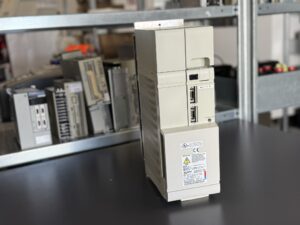
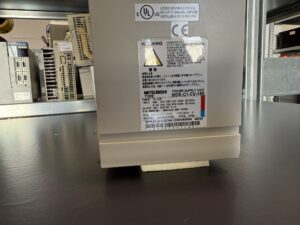
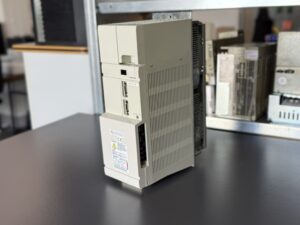
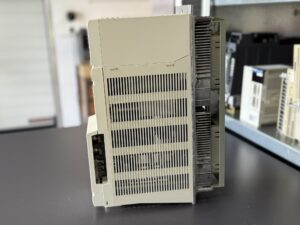
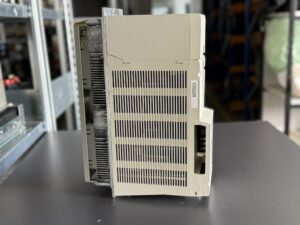
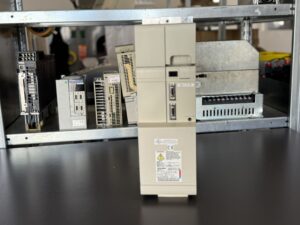
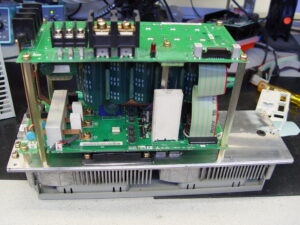
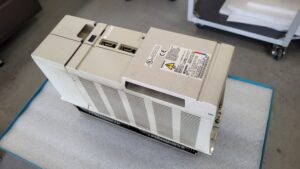
To mentioned Mitsubishi Drive: Mitsubishi MDS-C1-CV-185 Power Supply Unit
More details about our Mitsubishi repair services can be found here:
Mitsubishi drive Repair by Industrypart
📞 Feel free to contact us with any questions about your Mitsubishi drive technology.
Our expert team is happy to help!
Technical Summary of the Unit
| Parameter | Value |
|---|
| Model | MDS-C1-CV-185 |
| Product Type | Power Supply Unit |
| Rated Power | 18.5 kW |
| Input Voltage (3-phase) | 3PH 200–230 V, 50/60 Hz |
| Input Current (3-phase) | 66 A |
| Input Current (1-phase) | 0.2 A @ 1PH 200/230 V, 50/60 Hz |
| Output Voltage | DC 270–311 V |
| Output Current | 76 A |
| Manual Number | BNP-C3000 |
| Reference Standard | D/IN VDE0160 |
Typical Application Environment
The MDS-C1-CV-185 is widely used in industrial CNC machinery, particularly:
- Mazak, DMG Mori, and other Japanese machine tool brands
- Systems integrating Mitsubishi MDS-C1-V2 or MDS-B-SVJ2 servo drives
- Often found in machining centers, lathes, and milling machines
- Drives high-performance servo axes and spindles
- Used in demanding production lines with automatic tool changers
- Compatible with HF, HA, HC Mitsubishi AC servo motors
Functional Description
The Mitsubishi MDS-C1-CV-185 power supply unit delivers stabilized DC power for connected drives and control circuits:
- Main output: DC 270–311 V for drive systems (up to 76 A)
- Auxiliary output: DC 24 V / 7.5 A for logic supply, control, and brakes
- Includes integrated brake chopper circuit
- Powers up to 3 servo axes or 1–2 drives with spindle motors
- Internal safeguards: short-circuit, overcurrent, and overvoltage protection
- Monitored via status LEDs and fuses
- Critical part of the Mitsubishi CNC automation architecture
Alarm Messages and Troubleshooting (Selection)
| Alarm No. | Description | Cause | Solution |
|---|
| 12 | Memory Error | Error in SRAM/FLROM memory | Replace drive unit |
| 13 | Software Processing Error 1 | Interrupted program execution | Reflash firmware or replace drive |
| 17 | A/D Converter Error | Fault in analog-to-digital conversion circuit | Replace drive unit |
| 25 | Absolute Position Lost | Battery low or encoder cable disconnected | Replace battery, check encoder cable |
| 27 | Scale CPU Error | Communication failure with absolute scale | Inspect and replace scale cables |
| 31 | Overspeed | Motor exceeded allowable speed | Check servo parameters and load |
| 32 | Power Module Overcurrent | Internal overcurrent in IPM module | Check drive and motor connections |
| 34 | NC Communication CRC Error | Data corruption between NC and drive | Check communication cable and protocol |
| 58 | Collision Error | Mechanical collision detected | Adjust collision detection settings |
| 59 | Collision Detection 1 | Abnormal vibration or external impact | Improve mechanical stability, adjust limits |